Numerical Methods in Trigonometry
Article objectives
We were able to solve the trigonometric equations fairly easily, which in general is not the case. For example, consider the equation
$$cos x = x \; \; \; \; (1)$$
There is a solution, as shown in Figure 1 below. The graphs of y = cos x and y = x intersect somewhere between x = 0 and x = 1, which means that there is an x in the interval [0,1] such that cos x = x.

Unfortunately there is no trigonometric identity or simple method which will help us here. Instead, we have to resort to numerical methods, which provide ways of getting successively better approximations to the actual solution(s) to within any desired degree of accuracy. There is a large field of mathematics devoted to this subject called numerical analysis. Many of the methods require calculus, but luckily there is a method which we can use that requires just basic algebra. It is called the secant method, and it finds roots of a given function f(x), i.e. values of x such that f(x) = 0. A derivation of the secant method is beyond the scope of this book, but we can state the algorithm it uses to solve f(x) = 0:
-
Pick initial points x0 and x1 such that x0 < x1 and f(x0) f(x1) < 0 (i.e. the solution is somewhere between x0 and x1).
-
For n ≥ 2, define the number xn by
$$x_n = x_{n-1} = \frac{x_{n-1} - x_{n-2} f(x_{n-1})}{f(x_{n-1}) − f(x_{n-2})}$$
as long as |x n−1 − x n−2 | > ε error, where ε error > 0 is the maximum amount of error desired (usually a very small number).
-
The numbers x0, x1, x2, x3, ... will approach the solution x as we go through more iterations, getting as close as desired.
We will now show how to use this algorithm to solve the equation cos x = x. The solution to that equation is the root of the function f(x) = cos x− x. And we saw that the solution is somewhere in the interval [0,1]. So pick x0 = 0 and x1 = 1. Then f(0) = 1 and f(1) = −0.4597, so that f(x0) f(x1) < 0 (we are using radians, of course). Then by definition,
$$x_2 = x_1 − \frac{(x_1 − x_0)f(x_1)}{f(x_1) −f(x_0)}$$ $$= 1 − \frac{(1 − 0)f(1)}{f(1) −f(0)}$$ $$= 1 − \frac{(1 − 0)(−0.4597)}{−0.4597 − 1}$$ $$= 0.6851 ,$$ $$x_3 = x_2 − \frac{(x_2 − x_1)f(x_2)}{f(x_2) −f(x_1)}$$ $$= 0.6851 − \frac{(0.6851 − 1)f(0.6851)}{f(0.6851) −f(1)}$$ $$= 0.6851 − \frac{(0.6851 − 1)(0.0893)}{0.0893 − (−0.4597)}$$ $$= 0.7363 ,$$
and so on. Using a calculator is not very efficient and will lead to rounding errors. A better way to implement the algorithm is with a computer. Listing 1 below shows the code (secant.java) for solving cos x = x with the secant method, using the Java programming language:
Listing 1 Program listing for secant.java
1 import java.math.*;
2 public class secant {
3   public static void main (String[] args) {
4     double x0 = Double.parseDouble(args[0]);
5     double x1 = Double.parseDouble(args[1]);
6     double x = 0;
7     double error = 1.0E-50;
8     for (int i=2; i <= 10; i++) {
9       if (Double.compare(Math.abs(x0 - x1),error) > 0) {
10       x = x1 - (x1 - x0)*f(x1)/(f(x1) - f(x0));
11       x0 = x1;
12       x1 = x;
13       System.out.println("x" + i + " = " + x);
14     } else {
15       break;
16     }
17   }
18   MathContext mc = new MathContext(50);
19   BigDecimal answer = new BigDecimal(x,mc);
20   System.out.println("x = " + answer);
21 }
22 //Define the function f(x)
23   public static double f (double x) {
24     return Math.cos(x) - x;
25   }
26 }
Lines 4-5 read in x0 and x1 as input parameters to the program.
Line 6 initializes the variable that will eventually hold the solution.
Line 7 sets the maximum error \(\epsilon_{error}\) to be 1.0 × 10−50. That is, our final answer will be within that (tiny!) amount of the real solution.
Line 8 starts a loop of 9 iterations of the algorithm, i.e. it will create the successive approximations x2, x3, ..., x10 to the real solution, though in Line 9 we check to see if the two previous approximations differ by less than the maximum error. If they do, we stop (since this means we have an acceptable solution), otherwise we continue.
Line 10 is the main step in the algorithm, creating xn from xn−1 and xn−2.
Lines 11-12 set the new values of xn−2 and xn−1, respectively.
Lines 18-20 set the number of decimal places to show in the final answer to 50 (the default is 16) and then print the answer.
Lines 23-24 give the definition of the function f(x) = cos x−x.
Below is the result of compiling and running the program using x0 = 0 and x1 = 1:
javac secant.java
java secant 0 1
x2 = 0.6850733573260451
x3 = 0.736298997613654
x4 = 0.7391193619116293
x5 = 0.7390851121274639
x6 = 0.7390851332150012
x7 = 0.7390851332151607
x8 = 0.7390851332151607
x = 0.73908513321516067229310920083662495017051696777344
Notice that the program only got up to x8, not x10. The reason is that the difference between x8 and x7 was small enough (less than \(\epsilon_{error}\) = 1.0 × 10−50) to stop at x8 and call that our solution. The last line shows that solution to 50 decimal places.
When taking repeated cosines starting with any number (in radians), you eventually start getting the above number repeatedly after enough iterations. This turns out not to be a coincidence. Figure 2 gives an idea of why.
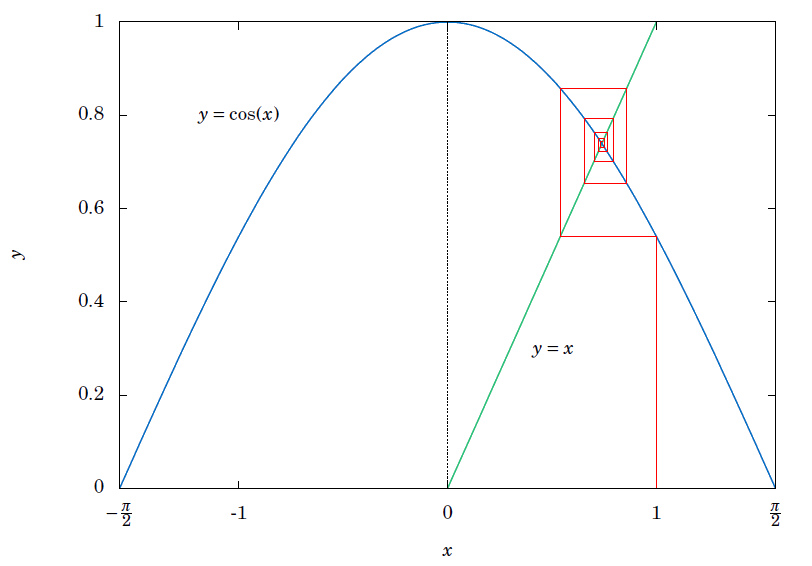
Since x = 0.73908513321516... is the solution of cos x = x, you would get cos (cos x) = cos x = x, so cos (cos (cos x)) = cos x = x, and so on. This number x is called an attractive fixed point of the function cos x. No matter where you start, you end up getting “drawn” to it. Figure 2 shows what happens when starting at x = 0: taking the cosine of 0 takes you to 1, and then successive cosines (indicated by the intersections of the vertical lines with the cosine curve) eventually “spiral” in a rectangular fashion to the fixed point (i.e. the solution), which is the intersection of y = cos x and y = x.
Recall that the maximum and minimum of the function y = cos 6x+sin 4x were ±1.90596111871578, respectively. We can show this by using the open-source program Octave. Octave uses a successive quadratic programming method to find the minimum of a function f(x). Finding the maximum of f(x) is the same as finding the minimum of −f(x) then multiplying by −1 (why?). Below we show the commands to run at the Octave command prompt (octave:n>) to find the minimum of f(x) = cos 6x+sin 4x. The command sqp(3,’f’) says to use x = 3 as a first approximation of the number x where f(x) is a minimum.
octave:1> format long
octave:2> function y = f(x)
> y = cos(6*x) + sin(4*x)
> endfunction
octave:3> sqp(3,’f’)
y = -1.90596111871578
ans = 2.65792064609274
The output says that the minimum occurs when x = 2.65792064609274 and that the minimum is −1.90596111871578. To find the maximum of f(x), we find the minimum of −f(x) and then take its negative. The command sqp(2,’f’) says to use x = 2 as a first approximation of the number x where f(x) is a maximum.
octave:4> function y = f(x)
> y = -cos(6*x) - sin(4*x)
> endfunction
octave:5> sqp(2,’f’)
y = -1.90596111871578
ans = 2.05446832062993
The output says that the maximum occurs when x = 2.05446832062993 and that the maximum is −(−1.90596111871578) = 1.90596111871578.
Recall that Heron’s formula is adequate for “typical” triangles, but will often have a problem when used in a calculator with, say, a triangle with two sides whose sum is barely larger than the third side. However, you can get around this problem by using computer software capable of handling numbers with a high degree of precision. Most modern computer programming languages have this capability. For example, in the Python programming language (chosen here for simplicity) the decimal module can be used to set any level of precision. Below we show how to get accuracy up to 50 decimal places using Heron’s formula for the triangle by using the python interactive command shell:
>>> from decimal import *
>>> getcontext().prec = 50
>>> a = Decimal("1000000")
>>> b = Decimal("999999.9999979")
>>> c = Decimal("0.0000029")
>>> s = (a+b+c)/2
>>> K = s*(s-a)*(s-b)*(s-c)
>>> print Decimal(K).sqrt()
0.99999999999894999999999894874999999889618749999829
(Note: The triple arrow >>> is just a command prompt, not part of the code.)
Notice in this case that we do get the correct answer; the high level of precision eliminates the rounding errors shown by many calculators when using Heron’s formula.
Another software option is Sage, a powerful and free open-source mathematics package based on Python. It can be run on your own computer, but it can also be run through a web interface: go to http://sagenb.org to create a free account, then once you register and sign in, click the New Worksheet link to start entering commands. For example, to find the solution to cos x = x in the interval [0,1], enter these commands in the worksheet textfield:
x = var(’x’)
find_root(cos(x) == x, 0,1)
Click the evaluate link to display the answer: 0.7390851332151559